

PAYE · RTI · CIS · HMRC online filing
PAYE, RTI and CIS filed
from your own desktop.
Full Payment Submissions, Employer Payment Summaries, CIS300 returns, and subcontractor verifications go to HMRC from the PC in front of you, and the Government Gateway credentials never leave it.

 Excellent 4.7 out of 5 37 reviews
 - HMRC-recognised since 2004
- Nearly 10,000 companies and their agents
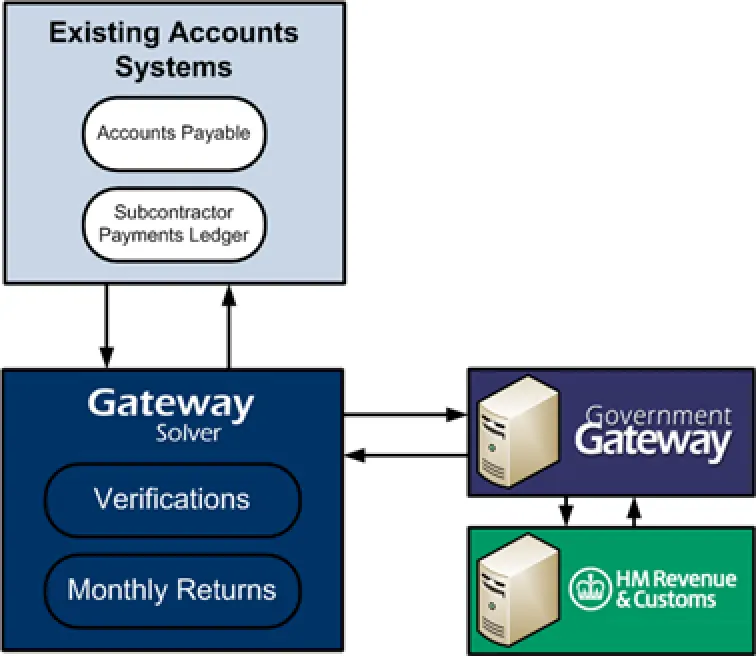
What the desktop files
- PAYE / RTI: Full Payment Submission, Employer Payment Summary, Employer Alignment Submission, and Earlier Year Update
- P11D and P11D(b) expenses and benefits, and a National Insurance number verification
- CIS300 monthly returns and subcontractor verifications
- Import from CSV or Excel, or drive it from payroll or an in-house system
- Fill in, transmit, and automate uploads to HMRC
- Returns history, reporting, and emailed submission receipts
- Government Gateway credentials stay on your machine
- Annual licence, kept current through every HMRC change, with no hidden fees
Install and updates
One installer covers both sides of the product, whether you are a payroll bureau filing Full Payment Submissions or a contractor verifying subcontractors and filing CIS300s. Government Gateway credentials stay on the machine that files.
The walk-through is on install Gateway Solver, and the same file,
SetupGatewaySolver.exe, both installs a new copy and updates an existing one.
Version 2.95 and later talk to https://gatewaysolver.evolvedsoftware.com, so allow
*.evolvedsoftware.com and the HMRC / Government Gateway hosts on TCP 443. Checksums are in the
release notes.
One thing to know before your first CIS300: HMRC’s own portal does not display returns filed through commercial software, so keep the emailed receipt. The detail is in why a CIS300 is missing from the HMRC dashboard.
HMRC recognition
HMRC lists Evolved Software Studios Ltd for Gateway Solver and Insite 123 on its CIS commercial software suppliers page, under both the current name and the earlier one, Insite 123. A place on that list means the product has filed a valid CIS300 with HMRC, which is the check you would want any filing software to have passed.
The address HMRC publishes for us is the CIS300 landing page.
Questions
What does Gateway Solver Desktop file?
PAYE/RTI and CIS, from a Windows desktop: Full Payment Submission, Employer Payment Summary, Employer Alignment Submission, Earlier Year Update, P11D and P11D(b), a National Insurance number verification, CIS300 monthly returns, and subcontractor tax-treatment verifications.
Where are Government Gateway credentials stored?
On the machine that files, so the return goes from there and nobody has to log into the Government Gateway by hand each time.
Why is a CIS300 missing from the HMRC dashboard?
HMRC’s own portal only shows CIS300s filed through the portal itself, so a return sent through any commercial software will be absent from that screen even though HMRC has received it. Your emailed submission receipt is the record to keep.
Help articles
- Gateway Solver Release Notes
- Installing Gateway Solver Updates
- Windows: Cannot access the specified device, path or file. You may not have the appropriate permissions to access the item.
- National Insurance Verification Request (NVR)
- Why can't I see my CIS300 return on the HMRC dashboard?
- What HMRC forms/returns are supported?
Licensed per company, and priced to match.
Email sales@evolvedsoftwarestudios.com with how many companies you file for and you will get a quote, or download the installer and look round first. Phone 0208 191 7797 if you would rather talk it through.